Turn Chrome into an Android control panel with CC ADB Studio
CC ADB Studio, developed by the entity associated with techstoriesindia.com, turns Chrome into a browser-based Android control panel for developers and enthusiasts. The extension runs ADB from inside the browser to provide interactive device control, media capture, file transfers, in-browser logging, and a web terminal for shell commands. It targets Android developers, QA testers, and ChromeOS users who need a quick, installation-free way to inspect and manage devices locally.
What CC ADB Studio is built to replace in a Chrome-first workflow
Studio positions the browser as a hands-on device interface for people who find traditional ADB setup cumbersome on ChromeOS and similar environments. Rather than asking users to install SDKs or native drivers, the tool offers a graphical alternative that centralizes day-to-day tasks in a single tab, so testers and small-team developers can move from device connection to interaction without switching platforms or command-line processes.
How it handles screen interaction and capture for manual testing
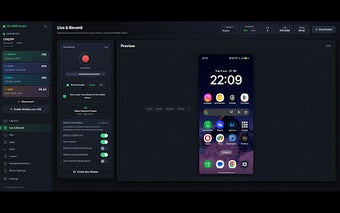
The app streams the device screen with options to adjust resolution and to interact using a mouse and keyboard, which supports exploratory testing and demoing. It also records screen sessions into MP4 or WebM and can capture audio from the device or microphone. For quick visual documentation, a built-in screenshot editor supplies crop, arrow, and blur controls so annotations stay inside the same workflow.
How it supports debugging and in-session device control
Studio exposes debugging tools that replace several separate utilities in a tester’s toolkit: a live logcat viewer with filtering for runtime inspection, a web terminal for executing shell commands, file push and pull with visible progress indicators, and APK installation and app launching from the interface. A toggle to switch a USB session to wireless ADB helps when testers need short cable-free interactions.
How it treats user data and which machines it requires
The extension processes operations locally on the user’s machine, so screen contents and file transfers do not leave the desktop environment. It runs within Chrome across desktop platforms but requires a device with a USB port and support for the WebUSB API, a dependency that determines whether a particular phone will connect without additional drivers.
A practical, browser-first ADB option for hands-on device work
CC ADB Studio is a practical choice for developers and testers who want interactive, desktop-based device control without native ADB installation. It fits workflows centered on manual debugging and quick demos rather than automated CI systems. Tip: enable developer options and USB debugging on the device before connecting to avoid setup delays when first pairing the device with the extension.